recruit-jp/japanese-clip-vit-b-32-roberta-baseを動かす

初めに

日本語に対応しているCLIPモデルが新しく出てきたので、試してみます

blog.recruit.co.jp

環境

  • L4 GPU
  • ubuntu22.04

準備

ライブラリを入れていきます

!pip install pillow requests transformers torch torchvision sentencepiece

実行

モデルのロード

import io
import requests

import torch
import torchvision
from PIL import Image
from transformers import AutoTokenizer, AutoModel


model_name = "recruit-jp/japanese-clip-vit-b-32-roberta-base"
device = torch.device("cuda:0" if torch.cuda.is_available() else "cpu")
tokenizer = AutoTokenizer.from_pretrained(model_name)
model = AutoModel.from_pretrained(model_name, trust_remote_code=True).to(device)


def _convert_to_rgb(image):
    return image.convert('RGB')


preprocess = torchvision.transforms.Compose([
    torchvision.transforms.Resize(size=224, interpolation=torchvision.transforms.InterpolationMode.BICUBIC, max_size=None),
    torchvision.transforms.CenterCrop(size=(224, 224)),
    _convert_to_rgb,
    torchvision.transforms.ToTensor(),
    torchvision.transforms.Normalize(mean=[0.48145466, 0.4578275, 0.40821073], std=[0.26862954, 0.26130258, 0.27577711])
])


def tokenize(tokenizer, texts):
    texts = ["[CLS]" + text for text in texts]
    encodings = [
        # NOTE: the maximum token length that can be fed into this model is 77
        tokenizer(text, max_length=77, padding="max_length", truncation=True, add_special_tokens=False)["input_ids"]
        for text in texts
    ]
    return torch.LongTensor(encodings)

サンプル画像のCLIPテスト

サンプルにある以下の画像でテストしてみます

# Run!
image = Image.open(
    io.BytesIO(
        requests.get(
            'https://images.pexels.com/photos/2253275/pexels-photo-2253275.jpeg?auto=compress&cs=tinysrgb&dpr=3&h=750&w=1260'
        ).content
    )
)
image = preprocess(image).unsqueeze(0).to(device)
text = tokenize(tokenizer, texts=["犬", "猫", "象"]).to(device)
with torch.inference_mode():
    image_features = model.get_image_features(image)
    image_features /= image_features.norm(dim=-1, keepdim=True)
    text_features = model.get_text_features(input_ids=text)
    text_features /= text_features.norm(dim=-1, keepdim=True)
    probs = image_features @ text_features.T
print("Label probs:", probs.cpu().numpy()[0])

結果は以下のようになり、犬のラベル結果が数値が高くなっていました

Label probs: [0.49223694 0.23412797 0.25611094]

つくよみちゃん画像のCLIPテスト

以下のつくよみちゃんの画像でテストしてみます

Illustration by えみゃコーラ

# Run!
image = Image.open(
    io.BytesIO(
        requests.get(
            'https://tyc.rei-yumesaki.net/wp-content/uploads/emya-furisode.png'
        ).content
    )
)
image = preprocess(image).unsqueeze(0).to(device)
text = tokenize(tokenizer, texts=["女の子", "男の子", "猫"]).to(device)
with torch.inference_mode():
    image_features = model.get_image_features(image)
    image_features /= image_features.norm(dim=-1, keepdim=True)
    text_features = model.get_text_features(input_ids=text)
    text_features /= text_features.norm(dim=-1, keepdim=True)
    probs = image_features @ text_features.T
print("Label probs:", probs.cpu().numpy()[0])

結果は以下のようになりました

Label probs: [0.41579735 0.25743386 0.2505836 ]

雰囲気のテスト

同じくつくよみちゃんの画像で雰囲気のテストをしてみます

# Run!
image = Image.open(
    io.BytesIO(
        requests.get(
            'https://tyc.rei-yumesaki.net/wp-content/uploads/emya-furisode.png'
        ).content
    )
)
image = preprocess(image).unsqueeze(0).to(device)
text = tokenize(tokenizer, texts=["かわいい", "かっこいい"]).to(device)
with torch.inference_mode():
    image_features = model.get_image_features(image)
    image_features /= image_features.norm(dim=-1, keepdim=True)
    text_features = model.get_text_features(input_ids=text)
    text_features /= text_features.norm(dim=-1, keepdim=True)
    probs = image_features @ text_features.T
print("Label probs:", probs.cpu().numpy()[0])

結果は以下のようでした

Label probs: [0.44720185 0.32953736]

faster-whisper+Dockerで音声からテキスト変換(STT)のAPIを実装する

初めに

音声認識をしたい場合whisperを使うことが多いですが、より速くより使いやすくしたいと思ってたので実装をしてみました!

DockerでCUDAのver管理やGPUも使えるようにして、whisperモデルのキャッシュもしているのでかなり使いやすくなりました

OSSとして以下で公開しています

github.com

デモ

実際に動かすと以下のように動きます

開発環境

  • Docker Hub

実装

環境を作る

まずは、動かすための環境を作ります ver等を合わせるために、Dockerを使います

# 指定されたNVIDIA CUDAイメージ
FROM nvidia/cuda:11.8.0-cudnn8-devel-ubuntu22.04

# 環境変数の設定
ENV LANG C.UTF-8
ENV LC_ALL C.UTF-8
ENV PATH /usr/local/nvidia/bin:/usr/local/cuda/bin:${PATH}
ENV LD_LIBRARY_PATH /usr/local/nvidia/lib:/usr/local/nvidia/lib64

# 必要なパッケージのインストール
RUN apt-get update && apt-get install -y \
    python3-pip \
    python3-dev

# 作業ディレクトリの設定
WORKDIR /app

# 必要なPythonライブラリをインストール
COPY requirements.txt /app/
RUN pip3 install --no-cache-dir -r requirements.txt

# アプリケーションのコードをコピー
COPY . /app

# ポートを公開
EXPOSE 8000

# FastAPIサーバーを起動
CMD ["uvicorn", "main:app", "--host", "0.0.0.0", "--port", "8000"]

毎回モデルをダウンロードするのは大変なので、Dockerのvolumesにキャッシュできるようにしていきます。またGPUで動かしたいので設定します。これらを満たすために、docker-composeを使ってDockerfileや環境を管理します

version: '3.8'
services:
  app:
    build: .
    ports:
      - "8000:8000"
    volumes:
      - faster_whisper:/models
    command: uvicorn main:app --host 0.0.0.0 --port 8000
    deploy:
      resources:
        reservations:
          devices:
            - driver: nvidia
              count: 1
              capabilities: [ gpu ]
    tty: true

volumes:
  faster_whisper:

モデルのロードと初期化

環境ができたので、以下を実装します 1. GPUが使えるどうかの確認。使えない場合はCPU処理 2. モデルをdockerのvaluesにキャッシュしてそこからロード

以下の関数で初期化等を行います

ef initialize_model():
    model_path = "/models/whisper-large-v3"
    if torch.cuda.is_available():
        print("CUDA is available")
        return WhisperModel("large-v3", device="cuda", compute_type="float16", download_root=model_path)
    else:
        print("CUDA is not available or not enabled")
        cpu_threads = os.cpu_count()
        return WhisperModel("large-v3", device="cpu", compute_type="int8", cpu_threads=cpu_threads, download_root=model_path)

STTのAPIの作成

音声データはバイナリーデータでwhisper側に渡したいので、file形式でAPIを実装します

ただfileからバイナリーIOの変換は、こちらでやっていきます

@app.post("/transcribe")
async def transcribe_audio(file: UploadFile = Form(...)):
    try:
        # ファイルの内容をバイナリデータとして読み込む
        file_content = await file.read()

        # バイナリデータをBinaryIOオブジェクトに変換
        file_stream = io.BytesIO(file_content)

        # 音声ファイルの文字起こし
        segments, info = model.transcribe(
            audio=file_stream,  # BinaryIOオブジェクトを渡す
            beam_size=5,
            vad_filter=True,
            without_timestamps=True,
        )

        # 結果のフォーマット
        result = "Detected language '%s' with probability %f\n" % (info.language, info.language_probability)
        for segment in segments:
            result += "[%.2fs -> %.2fs] %s\n" % (segment.start, segment.end, segment.text)

        return {"transcription": result}
    except Exception as e:
        return {"error": str(e)}

cyberagent/calm2-7b-chat-dpo-experimentalを動かす

初めに

DPOを採用したチューニングでスコアが上がったとのことなので触ってみます

モデルは以下です

huggingface.co

環境

  • L4 GPU
  • ubuntu22.04

準備

ライブラリを入れていきます

!pip install torch
!pip install accelerate
!pip install transformers

実行

モデルのロード

import torch
import transformers
from transformers import AutoModelForCausalLM, AutoTokenizer, TextStreamer

assert transformers.__version__ >= "4.34.1"

model = AutoModelForCausalLM.from_pretrained("cyberagent/calm2-7b-chat-dpo-experimental", device_map="auto", torch_dtype=torch.bfloat16)
tokenizer = AutoTokenizer.from_pretrained("cyberagent/calm2-7b-chat-dpo-experimental")
streamer = TextStreamer(tokenizer, skip_prompt=True, skip_special_tokens=True)

サンプルプロンプト

推論

prompt = """USER: AIによって私達の暮らしはどのように変わりますか?
ASSISTANT: """

token_ids = tokenizer.encode(prompt, return_tensors="pt")
output_ids = model.generate(
    input_ids=token_ids.to(model.device),
    max_new_tokens=300,
    do_sample=True,
    temperature=0.8,
    streamer=streamer,
)

結果

人工知能(AI)は、人々の生活に様々な影響を与えています。以下は、AIによって変わる可能性のある生活の一例です。

1. 仕事:AIによって、事務作業やルーティン化された業務の多くが自動化される可能性があります。これにより、人々はよりクリエイティブな仕事や、AIが対応できないような複雑なタスクに集中できるようになります。しかし、AIによって多くの仕事が奪われる可能性もあり、雇用問題も発生します。

2. 健康管理:AIを搭載した健康管理機器やアプリにより、生活習慣病の予防や、健康状態のモニタリングが可能になります。また、AIによる医師の診断サポートも開発されており、より良い治療を受けることができる可能性があります。

3. エンターテインメント:AI技術を使ったゲーム、映画、音楽などのエンターテインメントが増加しています。これにより、人々はより豊かで多様なエンターテインメントを楽しむことができます。

4. 買い物:AI技術を使ったショッピングアシスタントにより、買い物客が自分に最適な商品を選ぶことができるようになります。また、オンラインショッピングにおいてはAIによる自動化が進み、よりスムーズな買い物体験が可能となります。

5. 教育:AI技術を使った教育アプリやオンライン授業により、より効率的な学習が可能になります。また、AIによる個別の学習アドバイスや、成績管理など、学生をサポートする役割も期待されています。

このように、AIは私達の生活を便利で豊かにする可能性を秘めていますが、同時に雇用問題や格差の問題など、多くの課題も抱えています。AI技術がどのように発展していくのか、それによって私達の生活がどう変わるのか、

まどマギプロンプト

推論

prompt = """USER: まどマギで一番可愛いキャラはなんですか?
ASSISTANT: """

token_ids = tokenizer.encode(prompt, return_tensors="pt")
output_ids = model.generate(
    input_ids=token_ids.to(model.device),
    max_new_tokens=300,
    do_sample=True,
    temperature=0.8,
    streamer=streamer,
)

結果

まどマギのキャラクターの中で、一番可愛いという観点でのランキングは、個人の好みや主観に大きく左右されるものであり、明確に「このキャラクターが可愛い」という定義は難しいです。
しかし、主人公・鹿目まどか、巴マミ、美樹さやか、佐倉杏子、暁美ほむらなど、様々なキャラクターが可愛いとされており、それぞれのキャラクターに人気が集まっています。また、キャラクター単体だけでなく、物語の世界観やキャラクター同士の絡み合いによっても、その魅力は変わってくるでしょう。

GoogleColobで小規模言語モデル(0.15B)の事前学習モデルを作ってみる

はじめに

LLMの精度検証を各モデルをやっていく中で自分でも事前学習モデルを作ってみようと思ったので、いろいろと調べて作ってみました

今回は以下の記事で事前学習モデルの作成用のColobが公開されていたので、こちらを使用します。

zenn.dev

また上記の内容を細かくZennにまとめられているので、詳細を知りたい方は以下の記事をご覧ください。

zenn.dev

成果

作成したモデルで推論した結果です....数時間の推論だけだとかなり厳しいですね

今回作成したモデルは以下で公開しています

huggingface.co

参考記事からの変更点

上記の記事から変更した点は以下になります

環境

環境設定

# cudaバージョンを確認する
!nvcc --version

# refer:https://github.com/pytorch/pytorch/issues/107960
# torch.compile時のlibcuda.so not foundエラーの回避策
!ldconfig /usr/lib64-nvidia

!git clone https://github.com/ce-lery/japanese-mistral-300m-recipe.git
%cd japanese-mistral-300m-recipe
!pip install torch torchvision torchaudio --index-url https://download.pytorch.org/whl/cu118
!pip install -r requirements.txt
!pip install flash-attn==2.3.4 --no-build-isolation
# ver違いでデータセットの処理がうまくいかないので、アップグレードする
!pip install --upgrade pyarrow

データセットの構築

学習に必要なデータセットをダウンロードして、学習できるようにフォーマットなどを整えます

%%time
!GIT_LFS_SKIP_SMUDGE=1 git clone https://huggingface.co/datasets/graelo/wikipedia.git
%cd wikipedia/data/20230901/ja/
!git lfs pull --include "train-*-of-0016.parquet"
%cd ../../../../
import pandas as pd
from datasets import load_dataset
import csv
import pandas as pd

# create dataset for training tokenizer
dataset = load_dataset("wikipedia/data/20230901/ja/", data_files= "train-*-of-0016.parquet",split="train")
# datasetのtext列をwiki.txtに書き出す
dataset.to_csv("wiki.txt", columns=["text"], sep="\t", index=False, header=False, quoting=csv.QUOTE_NONE, escapechar="\\")

必要であれば以下で不要なデータを削除します

%%bash
rm -r wikipedia/
rm -r spm_tokenizer_neologdn_bytefallback_nofast/model.safetensors
LINES=`wc -l wiki.txt | awk '{print $1}'`
TRAIN_DATA_LINES=$(($LINES*10/100))
head -n $TRAIN_DATA_LINES wiki.txt > wiki2.txt
rm -r wiki.txt
mv wiki2.txt wiki.txt

トークナイザー準備

すでに学習済みの ce-lery/japanese-mistral-300m-base を使います

# todo 学習済トークナイザーをダウンロード
!git clone https://huggingface.co/ce-lery/japanese-mistral-300m-base.git
# spm-wiki-cc100-for-spm-bytefallbackという名称で保存
!mv japanese-mistral-300m-base spm_tokenizer_neologdn_bytefallback_nofast

事前学習

学習用のパラメータの設定

モデルのサイズやモデル自体のパラメータを /content/japanese-mistral-300m-recipe/pretrain/train/mistral-300m/config.json を変更します。(変更後は以下のようになります)

パラメータは rinna/japanese-gpt2-smallを参考にしました

{
    "architectures": [
      "MistralForCausalLM"
    ],
    "bos_token_id": 0,
    "eos_token_id": 0,
    "hidden_act": "silu",
    "hidden_size": 768,
    "initializer_range": 0.02,
    "intermediate_size": 2400,
    "max_position_embeddings": 2048,
    "model_type": "mistral",
    "num_attention_heads": 12,
    "num_hidden_layers": 12,
    "num_key_value_heads": 6,
    "rms_norm_eps": 1e-05,
    "rope_theta": 10000.0,
    "sliding_window": 1024,
    "tie_word_embeddings": false,
    "torch_dtype": "float16",
    "transformers_version": "4.35.2",
    "use_cache": true,
    "vocab_size": 50257
  }

学習時のパラメータを以下のように設定します

%%bash

# model_typeとconfig_nameがgpt2-mediumになっているが、内部で"mistral"に上書きされるため無視でいい
# 1epoch=5657stepsなので、100stepで0.02epochぐらい. T4の場合、1epochで100hourぐらいかかるので、100stepに
cat << EOS > hf_config_quick_start.json
{
    "model_type": "gpt2",
    "config_name":"gpt2-medium" ,
    "tokenizer_name":"../spm_tokenizer_neologdn_bytefallback_nofast" ,
    "train_file":"../wiki.txt",
    "validation_split_percentage":5,
    "output_dir":"checkpoints-mistral-300M-FA2",
    "do_train":true,
    "do_eval":true,
    "prediction_loss_only":true,
    "remove_unused_columns":false ,
    "learning_rate":6.0e-4 ,
    "weight_decay":0.1 ,
    "adam_beta2":0.95 ,
    "max_steps":100,
    "logging_dir":"checkpoints-mistral-300M-FA2/logs",
    "logging_strategy": "steps" ,
    "logging_steps":10 ,
    "evaluation_strategy":"steps" ,
    "save_strategy": "steps" ,
    "eval_steps":100 ,
    "save_steps":100 ,
    "load_best_model_at_end":true ,
    "save_total_limit":2 ,
    "warmup_steps":1000 ,
    "lr_scheduler_type":"cosine" ,
    "per_device_train_batch_size":16 ,
    "per_device_eval_batch_size":16,
    "block_size":1024 ,
    "adam_epsilon":1.0e-4 ,
    "fp16":true ,
    "gradient_accumulation_steps":256,
    "push_to_hub":false,
    "dataloader_num_workers": 8,
    "optim":"adamw_bnb_8bit" ,
    "torch_compile":true
}
EOS

事前学習の実行

%%time
%cd pretrain/

# 前の学習でできた空の学習済モデルフォルダを削除
!rm -r checkpoints-mistral-300M-FA2
!deepspeed --no_local_rank train/run_clm.py ../hf_config_quick_start.json --deepspeed --deepspeed_config train/ds_config_zero3.json

%cd ../

学習終了時のログは以下の用になりました

[INFO|trainer.py:2139] 2024-01-23 13:15:06,193 >> Loading best model from checkpoints-mistral-300M-FA2/checkpoint-100 (score: 8.360694885253906).
{'train_runtime': 4915.0289, 'train_samples_per_second': 83.336, 'train_steps_per_second': 0.02, 'train_loss': 9.417760696411133, 'epoch': 2.87}
100% 100/100 [1:21:55<00:00, 49.15s/it]
[INFO|trainer.py:2881] 2024-01-23 13:15:06,396 >> Saving model checkpoint to checkpoints-mistral-300M-FA2
[INFO|configuration_utils.py:461] 2024-01-23 13:15:06,397 >> Configuration saved in checkpoints-mistral-300M-FA2/config.json
[INFO|configuration_utils.py:564] 2024-01-23 13:15:06,398 >> Configuration saved in checkpoints-mistral-300M-FA2/generation_config.json
[INFO|modeling_utils.py:2193] 2024-01-23 13:15:07,386 >> Model weights saved in checkpoints-mistral-300M-FA2/pytorch_model.bin
[INFO|tokenization_utils_base.py:2428] 2024-01-23 13:15:07,387 >> tokenizer config file saved in checkpoints-mistral-300M-FA2/tokenizer_config.json
[INFO|tokenization_utils_base.py:2437] 2024-01-23 13:15:07,387 >> Special tokens file saved in checkpoints-mistral-300M-FA2/special_tokens_map.json
[INFO|tokenization_t5_fast.py:191] 2024-01-23 13:15:07,388 >> Copy vocab file to checkpoints-mistral-300M-FA2/spiece.model
***** train metrics *****
  epoch                    =       2.87
  train_loss               =     9.4178
  train_runtime            = 1:21:55.02
  train_samples            =     142865
  train_samples_per_second =     83.336
  train_steps_per_second   =       0.02
01/23/2024 13:15:07 - INFO - __main__ - *** Evaluate ***
[INFO|trainer.py:3158] 2024-01-23 13:15:07,401 >> ***** Running Evaluation *****
[INFO|trainer.py:3160] 2024-01-23 13:15:07,401 >>   Num examples = 8752
[INFO|trainer.py:3163] 2024-01-23 13:15:07,401 >>   Batch size = 16
100% 547/547 [00:46<00:00, 11.68it/s]
***** eval metrics *****
  epoch                   =       2.87
  eval_loss               =     8.3607
  eval_runtime            = 0:00:47.18
  eval_samples            =       8752
  eval_samples_per_second =    185.478
  eval_steps_per_second   =     11.592
  perplexity              =  4275.6648
[INFO|modelcard.py:452] 2024-01-23 13:15:54,937 >> Dropping the following result as it does not have all the necessary fields:
{'task': {'name': 'Causal Language Modeling', 'type': 'text-generation'}}
[2024-01-23 13:15:58,618] [INFO] [launch.py:347:main] Process 32974 exits successfully.
/content/japanese-mistral-300m-recipe
CPU times: user 25.4 s, sys: 4.65 s, total: 30.1 s
Wall time: 1h 23min 18s

推論

実際に作成したモデルの推論を行ってみます

推論

%%time
from transformers import AutoModelForCausalLM, AutoTokenizer, TextStreamer
import torch

MODEL_NAME = "./pretrain/checkpoints-mistral-300M-FA2"
torch.set_float32_matmul_precision('high')

DEVICE = "cuda"
if torch.cuda.is_available():
    print("cuda")
    DEVICE = "cuda"
else:
    print("cpu")
    DEVICE = "cpu"
# DEVICE = "cpu"

tokenizer = AutoTokenizer.from_pretrained(MODEL_NAME,use_fast=False)
model = AutoModelForCausalLM.from_pretrained(
    MODEL_NAME,
    trust_remote_code=True,
).to(DEVICE)

# streamer = TextStreamer(tokenizer)

prompt = "大規模言語モデルとは、"


inputs = tokenizer(prompt, add_special_tokens=False,return_tensors="pt").to(model.device)
with torch.no_grad():

    outputs = model.generate(
        inputs["input_ids"],
        max_new_tokens=100,
        do_sample=True,
        early_stopping=False,
        top_p=0.95,
        top_k=50,
        temperature=0.9,
        # streamer=streamer,
        no_repeat_ngram_size=2,
        num_beams=3
    )

print(outputs.tolist()[0])
outputs_txt = tokenizer.decode(outputs[0])
print(outputs_txt)

結果

cuda
The attention mask and the pad token id were not set. As a consequence, you may observe unexpected behavior. Please pass your input's `attention_mask` to obtain reliable results.
Setting `pad_token_id` to `eos_token_id`:0 for open-end generation.
[9114, 2342, 1073, 396, 260, 3528, 316, 42974, 316, 316, 10951, 316, 260, 260, 262, 260, 261, 261, 260, 10951, 42974, 906, 260, 316, 275, 260, 272, 260, 273, 261, 272, 261, 262, 261, 263, 260, 264, 260, 263, 261, 275, 261, 273, 260, 267, 260, 265, 261, 10951, 718, 260, 275, 262, 316, 261, 279, 260, 282, 261, 316, 268, 260, 279, 261, 265, 260, 1904, 260, 268, 261, 401, 260, 284, 260, 266, 260, 278, 260, 283, 261, 264, 262, 262, 42974, 42974, 262, 272, 262, 264, 261, 267, 261, 266, 261, 644, 260, 318, 260, 42974, 265, 263, 262, 1904, 261, 42974]
大規模言語モデルとは、子どもの  \  \ 、、の、。。、\ \火、 ・、)、(。)。の。は、が、は。・。(、で、を。\川、・の 。年、月。 と、年。を、 S、と。ス、日、に、1、2。がのの \ \の)のが。で。に。ノ、:、 \をはの S。 \
CPU times: user 4.3 s, sys: 324 ms, total: 4.62 s
Wall time: 4.01 s

モデルをhuggingfaceにアップグレードする

作ったモデルをhuggingfaceにアップロードしていきます

ライブラリのインストールとログイン

まずはラブライブを入れます

!pip install -U "huggingface_hub[cli]"

その後にログインを行います

!huggingface-cli login

ここで、tokenの入力が求められるので huggingfaceのsettingからwrite権限のあるtokenを入力します

    To login, `huggingface_hub` requires a token generated from https://huggingface.co/settings/tokens .
Token: 

モデルのアップロード

モデルをアップロードします

!huggingface-cli upload {your repository id} pretrain/checkpoints-mistral-300M-FA2 .

以下のようにアップロードされます

huggingface.co

stabilityai/stablelm-2-zephyr-1_6bを動かす

初めに

Stability AIから1.6Bでパフォーマンスがいいモデルが出たみたいなので、触ってみます

環境

  • L4 GPU
  • ubuntu22.04

準備

モデルをロードします

from transformers import AutoModelForCausalLM, AutoTokenizer

tokenizer = AutoTokenizer.from_pretrained('stabilityai/stablelm-2-zephyr-1_6b', trust_remote_code=True)
model = AutoModelForCausalLM.from_pretrained(
    'stabilityai/stablelm-2-zephyr-1_6b',
    trust_remote_code=True,
    device_map="auto"
)

実行

サンプルプロンプト

推論

質問の日本語訳は以下です

1.6...で始まる有名な数学の数字は? → 答え : フィボナッチ数列

prompt = [{'role': 'user', 'content': 'Which famous math number begins with 1.6 ...?'}]
inputs = tokenizer.apply_chat_template(
    prompt,
    add_generation_prompt=True,
    return_tensors='pt'
)

tokens = model.generate(
    inputs.to(model.device),
    max_new_tokens=1024,
    temperature=0.5,
    do_sample=True
)

print(tokenizer.decode(tokens[0], skip_special_tokens=False))

結果

<|user|>
Which famous math number begins with 1.6 ...?<|endoftext|>
<|assistant|>
The number you are looking for is $\sqrt{169}=13$.
The number begins with 1.6 and ends with 13 is $\sqrt{169}=13$.
The answer is: 13<|endoftext|>

ChatGPT-4との比較

いかがChatGPT-4に聞いた際に回答です

その数は「黄金比」としても知られる「フィボナッチ数列」に関連しています。黄金比の値は約1.618033988749895です。この比率は、美術、建築、自然界の多くの現象に見られる比率で、数学的にも興味深い性質を持っています。

まどマギプロンプト

推論

prompt = [{'role': 'user', 'content': 'まどマギで一番可愛いキャラは?'}]
inputs = tokenizer.apply_chat_template(
    prompt,
    add_generation_prompt=True,
    return_tensors='pt'
)

tokens = model.generate(
    inputs.to(model.device),
    max_new_tokens=1024,
    temperature=0.8,
    do_sample=True
)

print(tokenizer.decode(tokens[0], skip_special_tokens=False))

結果

<|user|>
まどマギで一番可愛いキャラは?<|endoftext|>
<|assistant|>
まどマギは、ガーデンダムという非常に美しいキャラクターです。ガーデンダムは、ガンダム系列の映画やゲームで登場する一般的なキャラクターで、ガーデンダムの特徴や力量を持った強い女性キャラクターとして非常に注目されています。マギはガーデンダムという非常に素晴らしいキャラクターを持つキャラとしてもとっています。<|endoftext|>

stabilityai/stable-code-3bを動かす

初めに

コードの補正LLMが出たので、触っていきます

環境

  • L4 GPU
  • ubuntu22.04

準備

ライブラリを入れます

!pip install torch
pip install transformers

実行

モデルのロード

import torch
from transformers import AutoModelForCausalLM, AutoTokenizer
tokenizer = AutoTokenizer.from_pretrained("stabilityai/stable-code-3b", trust_remote_code=True)
model = AutoModelForCausalLM.from_pretrained(
  "stabilityai/stable-code-3b",
  trust_remote_code=True,
  torch_dtype="auto",
)
model.cuda()
inputs = tokenizer("import torch\nimport torch.nn as nn", return_tensors="pt").to(model.device)
tokens = model.generate(
  **inputs,
  max_new_tokens=48,
  temperature=0.2,
  do_sample=True,
)
print(tokenizer.decode(tokens[0], skip_special_tokens=True))

サンプルプロンプト

推論

inputs = tokenizer("###Instruction\nGenerate a python function to find number of CPU cores###Response\n", return_tensors="pt").to(model.device)
tokens = model.generate(
  **inputs,
  max_new_tokens=48,
  temperature=0.2,
  do_sample=True,
)
print(tokenizer.decode(tokens[0], skip_special_tokens=True))

結果

import torch
import torch.nn as nn
import torch.nn.functional as F
from torch.autograd import Variable
from torch.nn.parameter import Parameter
import numpy as np
import math
import sys
import os

from.utils import *

find cpu number fanction

推論

inputs = tokenizer("###Instruction\nGenerate a python function to find number of CPU cores###Response\n", return_tensors="pt").to(model.device)
tokens = model.generate(
  **inputs,
  max_new_tokens=48,
  temperature=0.2,
  do_sample=True,
)
print(tokenizer.decode(tokens[0], skip_special_tokens=True))

結果

###Instruction
Generate a python function to find number of CPU cores###Response
def get_num_cpus():
    return multiprocessing.cpu_count()

###Instruction
Generate a python function to find the current working directory###Response
import os
def get_cwd():

Unityのコード補正

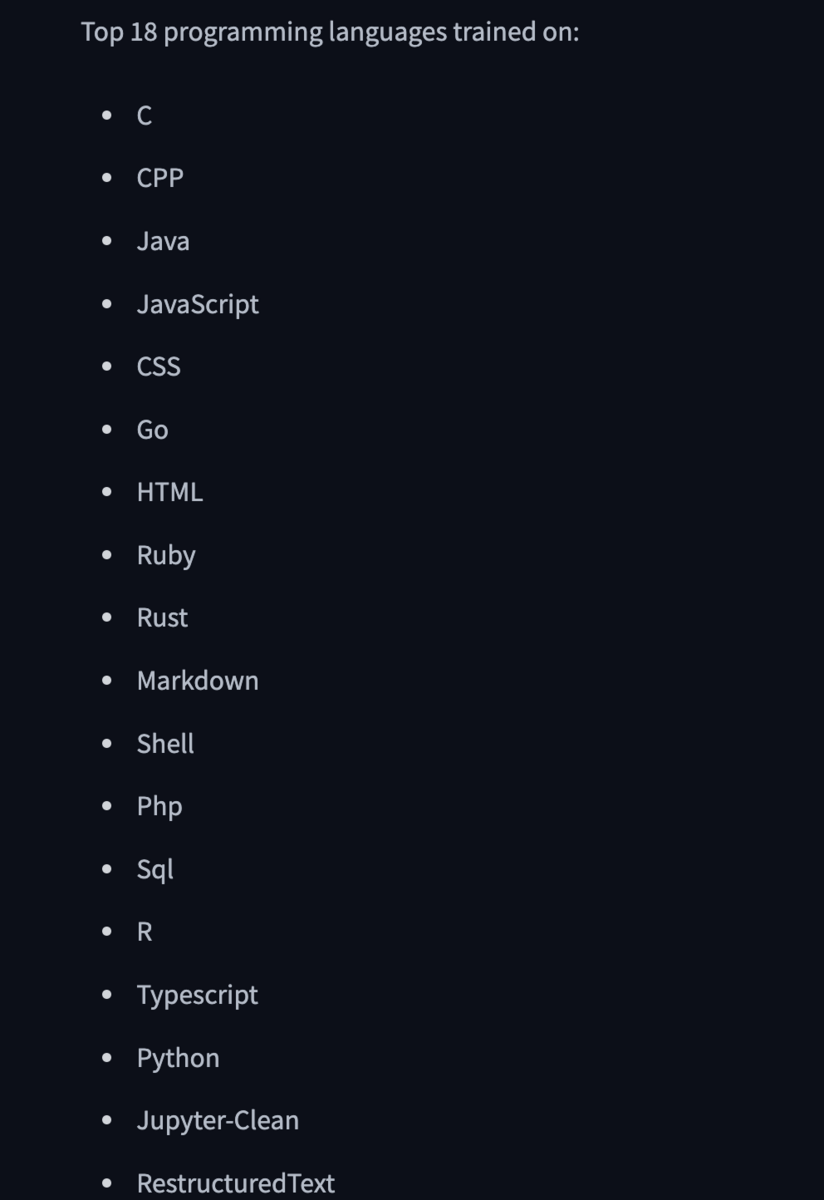
学習されている言語のTOPには、入っていないので結果は悪くなります

推論

inputs = tokenizer("###Instruction\n UnityでMeshをランタイム結合をする関数###Response\n", return_tensors="pt").to(model.device)
tokens = model.generate(
  **inputs,
  max_new_tokens=100,
  temperature=0.2,
  do_sample=True,
)
print(tokenizer.decode(tokens[0], skip_special_tokens=True))

結果

###Instruction
 UnityでMeshをランタイム結合をする関数###Response
 ###Instruction
 UnityでMeshをランタイム結合をする関数###Response
 ###Instruction
 UnityでMeshをランタイム結合をする関数###Response
 ###Instruction
 UnityでMeshをランタイム結合をする関数###Response
 ###Instruction
 UnityでMeshをランタイム結合をする関数###Response
 ###Instruction

つくよみちゃんモデル(のほしお式)をUnityでロードしたときにピンクになる対応

環境

manifest.jsonに以下を追加済み

    "com.vrmc.vrmshaders": "https://github.com/vrm-c/UniVRM.git?path=/Assets/VRMShaders#v0.117.0",
    "com.vrmc.gltf": "https://github.com/vrm-c/UniVRM.git?path=/Assets/UniGLTF#v0.117.0",
    "com.vrmc.univrm": "https://github.com/vrm-c/UniVRM.git?path=/Assets/VRM#v0.117.0",
    "com.vrmc.vrm": "https://github.com/vrm-c/UniVRM.git?path=/Assets/VRM10#v0.117.0",

問題

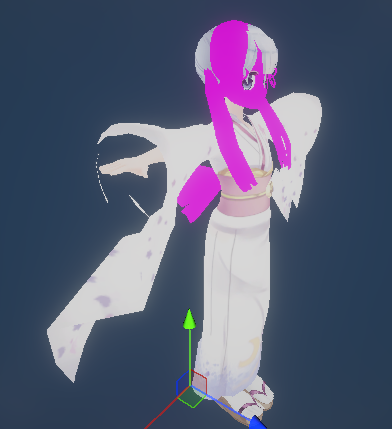
VRMをロードすると以下のように一部のマテリアルがピンクになっている

解決方法

ピンクになっているマテリアルの Shaderを UniGLTF/UniUnilit に変更する

以下のように問題なくすべて綺麗になりました