初めに
以下でOSSで音楽生成モデルが出たので、さわってみます
開発環境
環境構築
以下の設定をpyproject.tomlに追加(CUDA 12.4 + Flash Attention対応):
  [[tool.uv.index]]
  name = "pytorch-cu124"
  url = "https://download.pytorch.org/whl/cu124"
  explicit = true

  [tool.uv.sources]
  torch = { index = "pytorch-cu124" }
  torchaudio = { index = "pytorch-cu124" }
  torchvision = { index = "pytorch-cu124" }
  flash-attn = { url = "https://huggingface.co/lldacing/flash-attention-windows-wheel/resolve/main/flash_attn-2.7.4+cu126torch2.6.0cxx11abiFALSE-cp310-cp310-win_amd64.whl" }
依存関係のインストールします
uv sync
モデルのダウンロードします
  # Python APIを使用(Windows環境での文字化け回避)
  from huggingface_hub import snapshot_download

  snapshot_download("HeartMuLa/HeartMuLaGen", local_dir="./ckpt")
  snapshot_download("HeartMuLa/HeartMuLa-oss-3B", local_dir="./ckpt/HeartMuLa-oss-3B")
  snapshot_download("HeartMuLa/HeartCodec-oss", local_dir="./ckpt/HeartCodec-oss")
実行
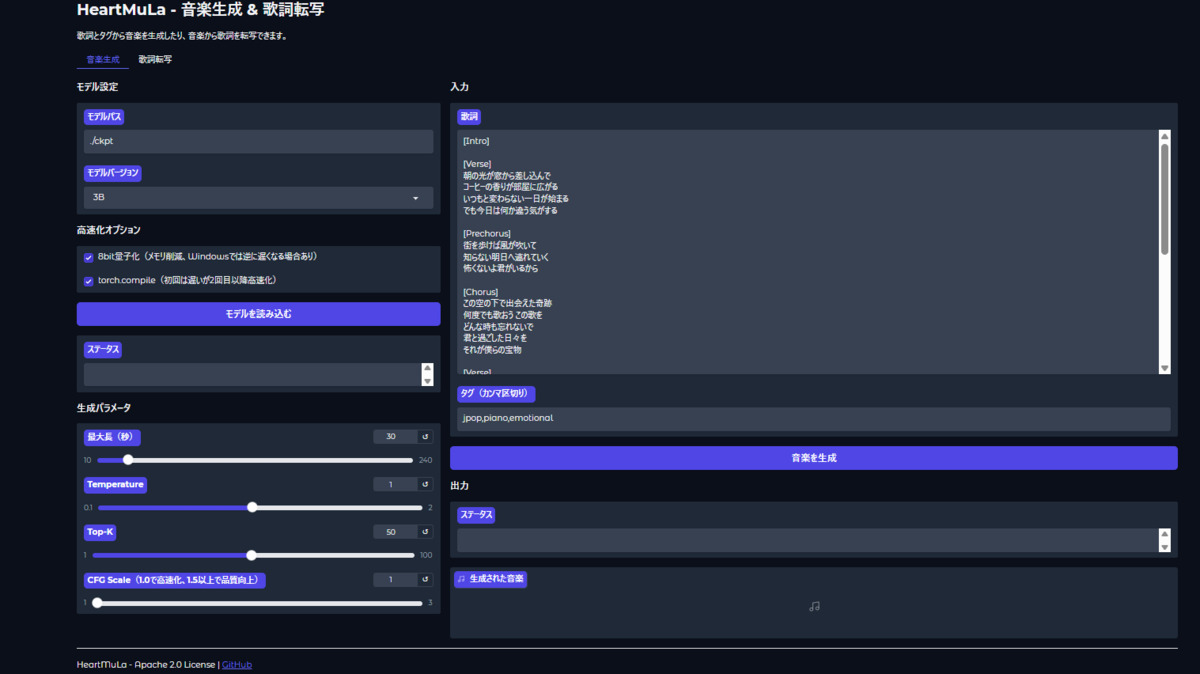
以下でGradio UIの起動します
uv run python app.py
起動をすると以下のようになります
日本語の歌詞付きの音楽を生成すると以下になります
普通にクオリティ高い(ただ高速化しても4分くらいかかる) pic.twitter.com/sL3ik502UR
— ようさん (@ayousanz) 2026年1月20日
